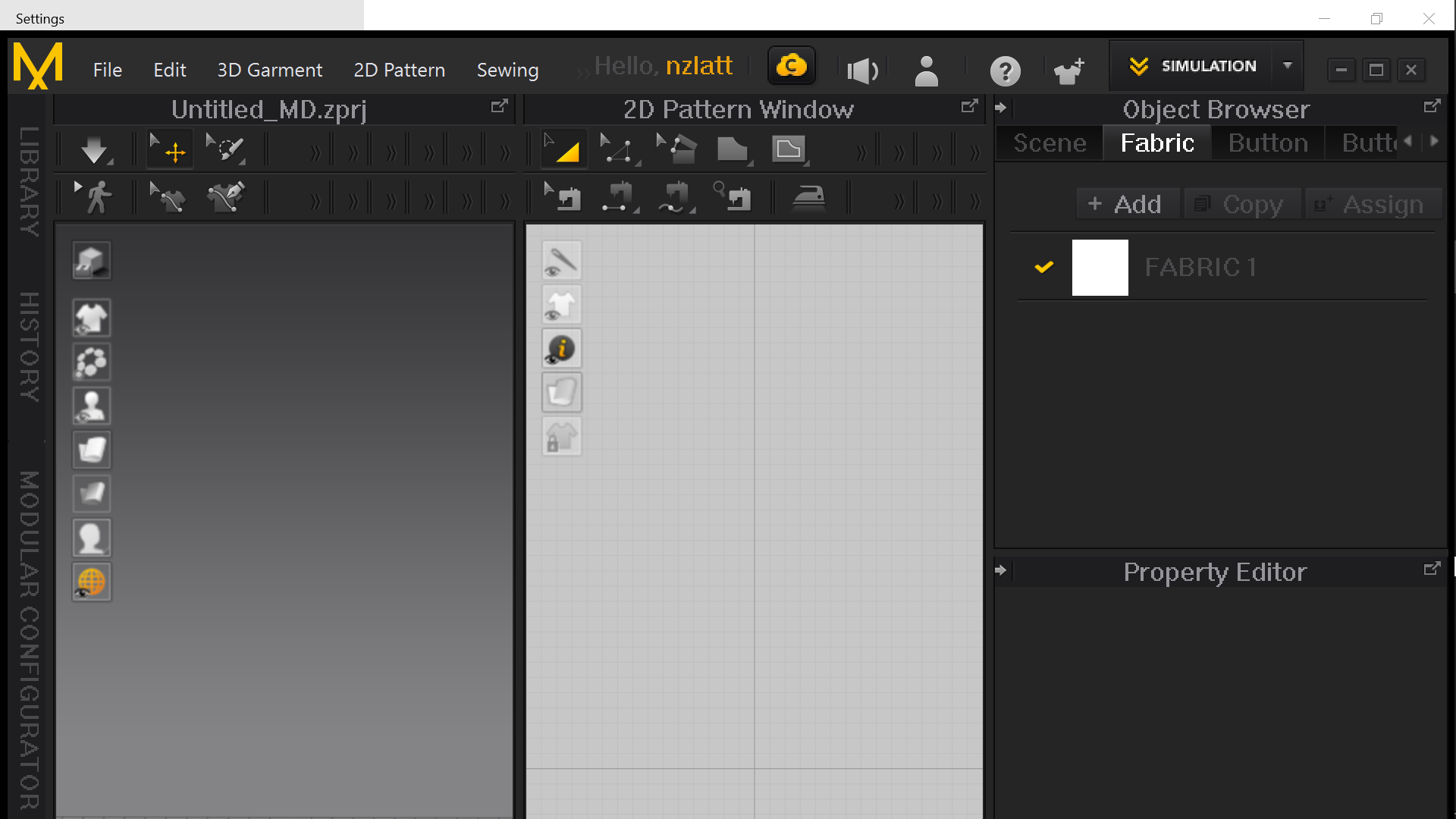
The resolution of the MD 10 is like in the screenshot shown below which is not like that in MD 9.
Is there any way to fix it please?
CD PROJEKT®, Cyberpunk®, Cyberpunk 2077® are registered trademarks of CD
PROJEKT S.A.
© 2021 CD PROJEKT S.A. All rights reserved. All other
copyrights and trademarks are the property of their respective owners.

The resolution of the MD 10 is like in the screenshot shown below which is not like that in MD 9.
Is there any way to fix it please?
You can go to the menu > settings > user settings > user interface > and change the applications screen size and font size..
Yes, but how can anyone follow your recommendation? There is NO SETTINGS in the MENU as you can see in the shot above. I have the same problem and all I have in the top menu is @File@
After digging through internet for 1 or 2 hours I was crying, sorry, and clicking everywhere and somehow when i click at the beginning of label @Hello, PattyPetty@ (nickname) the top menu appears. It doesn't appear regularly - like 1 time of 5-10 clicks.
There I pressed Settings and User Settings, then User Interface, and checked out Automatic Scale. It became better and I have my toolbar back on the screen.
请先登录再写评论。