I'm going to export the simulated clothes in Marvelous desinger and proceed with rendering in Maya.
However, I am planning to apply Subdivision for the exported clothes and proceed with the thickness.
As you know, if you apply Subdivision to the clothes that you ordered to export directly from Marvelous designer, there is no appropriate level on the edges of the fabrics, so you can see a bad subdivision form.
So, I added vertex on the border side of the exported clothes so that it can come out properly when applying Subdivison.
But this process seems too inefficient.
So the question is as follows.
1. Simulated clothes in the Marbleous desinger.
Maya will proceed with rendering, Subdivision will be applied, and thickness will be applied. In this case, is there a more efficient pipeline than my method mentioned above?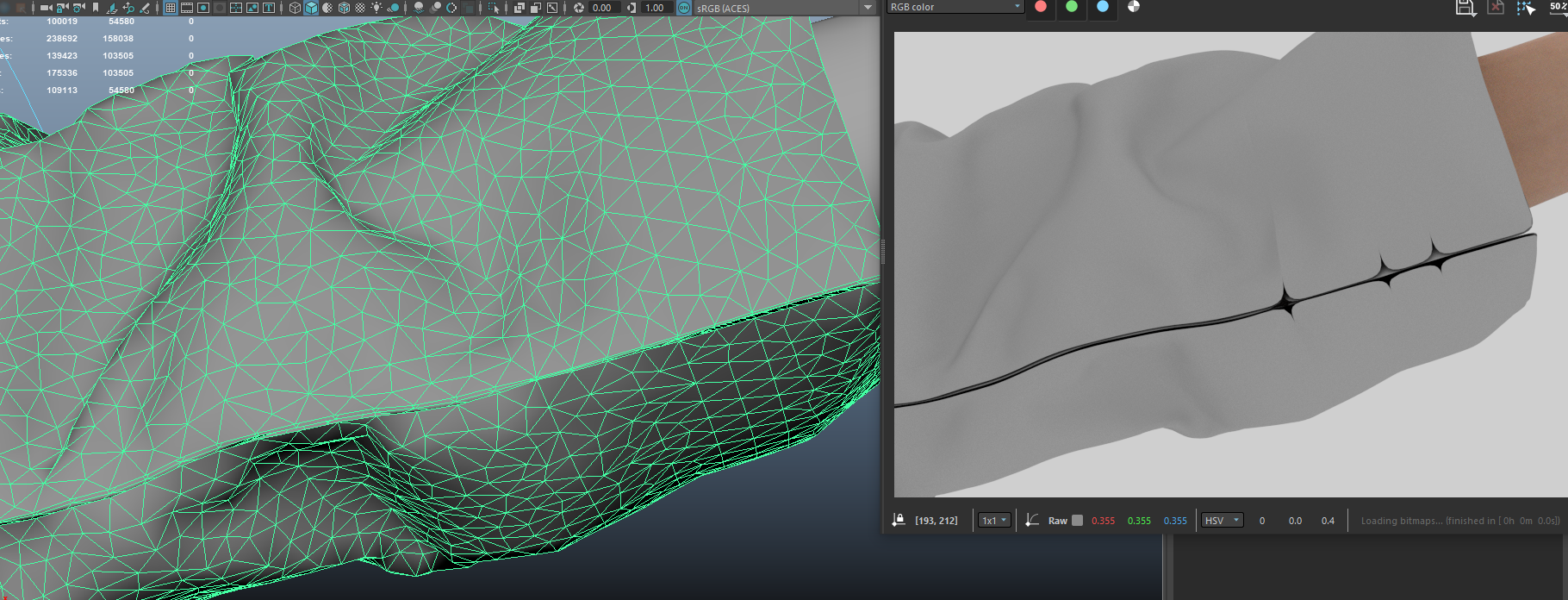

Hello @...
Thank you for contacting us!
According to your questions, I'd like to share with you the other way to try instead.
1. Change to quads (As @... mentioned)
2. Export with thin and weld option checked
3. Create thickness on other tools that you use (Maya or something)
I hope this information helps you! Should have further questions, please let us know! Have a lovely day :)
I don't use Maya, but have you tried exporting in quads?
I always export in quads, thin and weld. Applying subdivision and thickness after that won't be a problem.
Thank you guys all!!.
I'll try later!
And I have one question.
What is role about that option, weld??
@...
Yes !!
And as for your additional question, when you thick Weld option, it combines the Vertex (points of the mesh) of the parts of the pattern that are sewn together into one line into one point.
For your information, I've attached the manual. Please refer to the Weld part in the manual. (Click here)
请先登录再写评论。