
Hi,
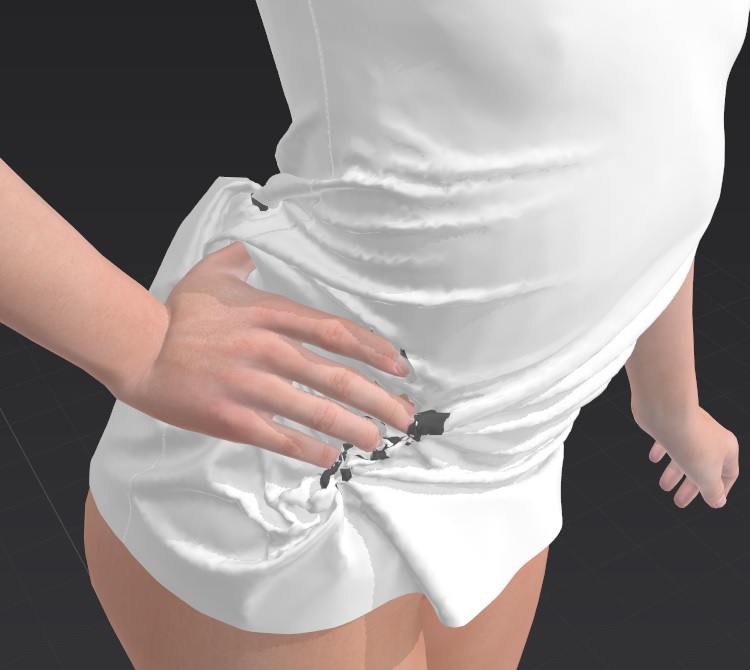
On the last frame of my animation, the right hand of the avatar is very close to the body. So the fabric tears.
Is there a way to avoid tearing of the fabric in this situation ?
In DazStudio, we can deactivate a part of the body so that it is not taken into account by the simulation. Does this option exist in Marvelous ?
Hi Christina,
Unfortunately, we don't have the option to deactivate part of the avatar at the moment.
You can try decreasing the skin offset by selecting the avatar, then go to Property Editor. Under Surface decrease skin Offset number. You can also try increasing scene time warp before recording the simulation to reduce the speed of Animation frames. Remember to set the scene time warp back to 1 before exporting.
If it's a custom animation brought into Marvelous Designer, you can create a proxy geometry for the hand. Since individual figures are not important in this simulation, you can create a proxy geometry of the outline of the hand and constraint it to the hand joint. You can also use blend shape to carve away some skin on the waist area to make more space for the garment.
In addition, in Marvelous Designer we do allow user to export the Animated Avatar. You can export the avatar with animation as Alembic cache by checking "Include Avatar Shape", and tweak it using your 3D software.
Best regards,
Marvelous Designer Support Team
Im having the same issue
请先登录再写评论。