Hi there
When I export my garment from MD as OBJ or Alembic to import it with C4D, the topstitch doesn't seem to export at all.
I would like to have the topstitch in C4D as 3D geometry preferably.
This is what my garment looks like in MD vs C4D:
These are my export settings, although I've tried every other combination, with no luck.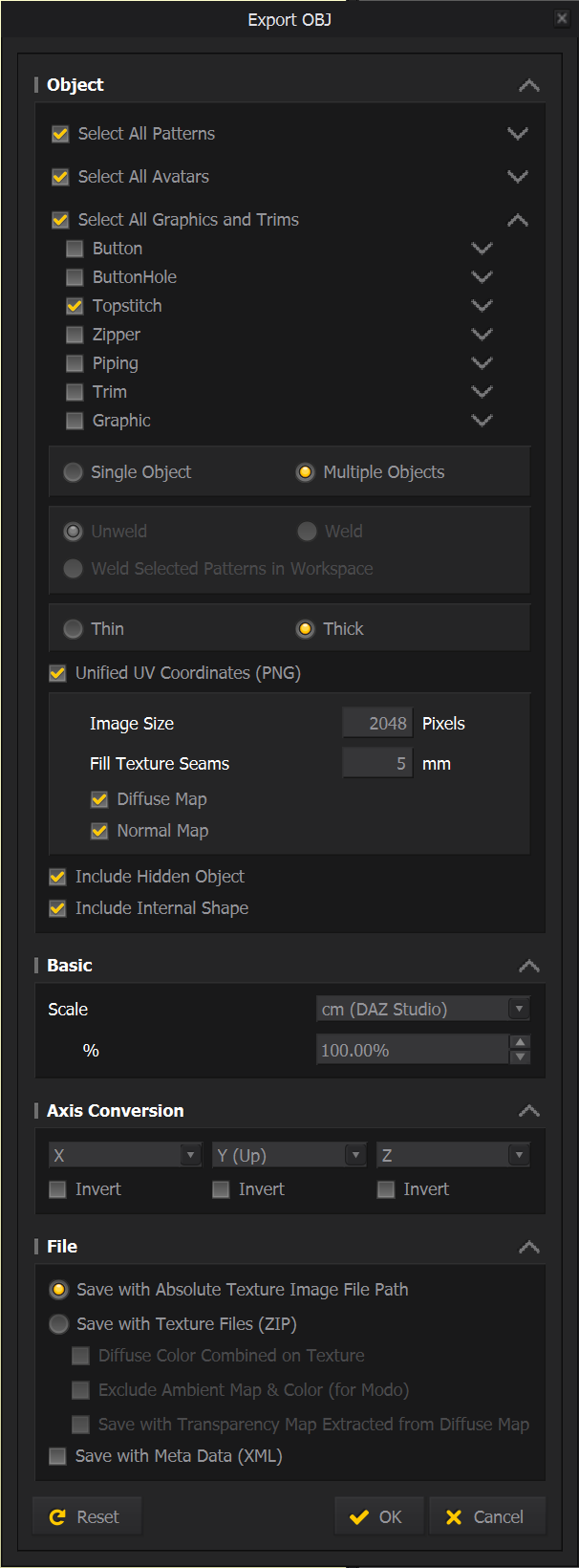
I also tried importing it with blender, just to see if the fault lies with C4D. But I wasn't able to see the topstitch in blender either.
Is there something I'm missing or doing wrong? Hoping someone can help.
Thanks
Arien

@...
Hello Wilson,
Thank you for contacting us.
As you mentioned, the top stitch won't be exported if you tick the Unified UV Coordinates (PNG) option.
In the current version, if you tick it on the export window, the mesh for obj stitch, print overlay (Graphic), and Button Hole are not saved and exported.
As the next best option, ticking "Diffuse Map" under the Unified UV Coordinates (PNG), the stitch can be baked as a texture.
I hope this information helps you.
If you need further assistance, please let us know :)
Hello Arien,
Thanks for leaving the inquiry to Marvelous Designer Team.
We will look into this as I replied in other ticket.
Thank you.
Have we not solved this yet? It still seems broken in 6.0.537.32823.
Hi Sonia
Thanks for the info.
Just to clarify on the option of baking the topstitch as texture - when exporting as obj make sure you uncheck the option "Select all graphics and trims". Which seems unintuitive because you want to export the trims of course. But it seems that this option is for 3D trims.
Took me ages to figure this out, an in-depth MD tutorial going into specifics, or more intuitive export settings would be much appreciated.
Thanks
Arien
댓글을 남기려면 로그인하세요.