
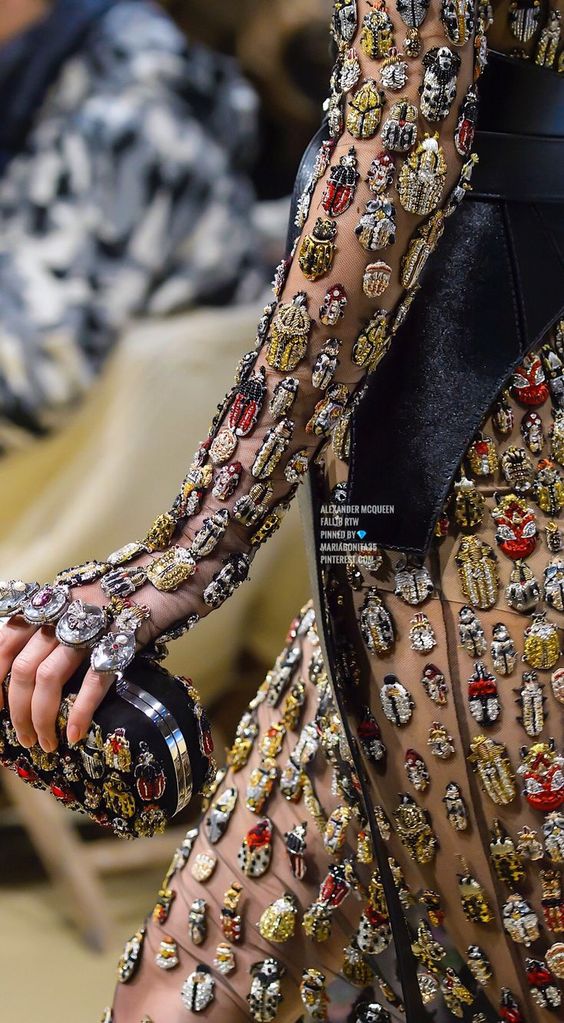
Can this clothing effect be made with marvelous designer?
What tools do you need if MD can't do it?
For example, do insects on clothes use 3D software modeling and then fabric simulation, or do they need substance designer to make texture?
Or is there a link to the tutorial?
When learning marvelou designer, I was a little troubled in the face of this type of clothing.
I hope someone can solve my confusion. Thank you.


Hi 李仕浩,
There are some tools you can uses in Marvelous Designer to try to achieve such design in Marvelous Designer.
1. For the cut out holes, you can create internal shapes in your patterns. Then select the internal shapes, right click and select "Cut and Sew". Duplicate your fabric, change the Opacity to 0 and assign it to the cutouts to make it transparent. In Fabric Physical Property setting, increase Stretch Warp to make the fabric stretch more in the vertical direction.
2. For the rigid geometry decertations, you can use button tool for it. You can create custom buttons in your 3D modeling software and import it as custom buttons in Marvelous designer.
Hope this helps!
댓글을 남기려면 로그인하세요.