Find attached the video of my simulation. I cannot make the cloth have the right simulation; it looks like the fabric doesn't have any weight, and it looks like it was floating.
https://www.dropbox.com/s/buxhcu1lxmfco5q/2022-12-22-10-18-53.mp4?dl=0
CD PROJEKT®, Cyberpunk®, Cyberpunk 2077® are registered trademarks of CD
PROJEKT S.A.
© 2021 CD PROJEKT S.A. All rights reserved. All other
copyrights and trademarks are the property of their respective owners.

Find attached the video of my simulation. I cannot make the cloth have the right simulation; it looks like the fabric doesn't have any weight, and it looks like it was floating.
https://www.dropbox.com/s/buxhcu1lxmfco5q/2022-12-22-10-18-53.mp4?dl=0
Hi,
Thank you for contacting us.
Could you please try changing the Simulation Quality preset to Animation (Stable) and record again?
To get rid of the faceting look:, you may want to select your avatar and click Smooth Avatar - Smooth in the property editor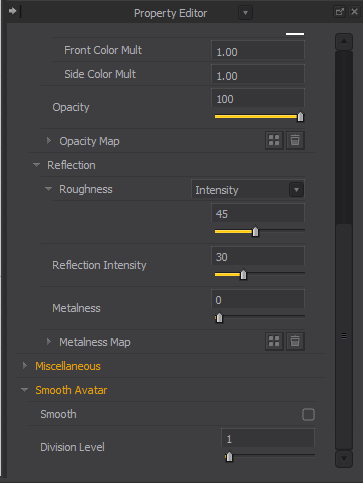
For more tips and tricks on using the Animation mode in Marvelous Designer, please watch our Animation Mode Tutorial [Here].
Best regards,
Marvelous Designer Support Team
댓글을 남기려면 로그인하세요.