I would like to make all pieces of my garment collide with an obj that I imported as a trim.
Is that possible?
There is a "Collider" checkbox in the property editor, however, it is greyed out and can't be activated.
CD PROJEKT®, Cyberpunk®, Cyberpunk 2077® are registered trademarks of CD
PROJEKT S.A.
© 2021 CD PROJEKT S.A. All rights reserved. All other
copyrights and trademarks are the property of their respective owners.

I would like to make all pieces of my garment collide with an obj that I imported as a trim.
Is that possible?
There is a "Collider" checkbox in the property editor, however, it is greyed out and can't be activated.
I too have had issues with this. I would like to know what the answer is.
Here is a link to the manual https://marvelousdesigner.zendesk.com/hc/en-us/articles/4406632098969-OBJ-Trim-Properties
To have Trim collision: toggle on or off it MUST NOT be attached to anything. then you can attach it after you have turned it on or off. We are working on improving the feature and know a few existing bugs but follow the information in the manual and you can use that option with trims
to "unglue" from the garment to toggle this option: right click the trim and choose "UNGLUE" to bring back that dialogue box.
So it is not possible to have a dangling solid rigid pieces collide with the cloth? How can one make something solid/rigid (i.e. medallion or jewelry) that can collide with the cloth?
@... read the manual I linked above. It is possible in V11 +, you must glue the imported trim AFTER you have turned on collision. This only works with files that are imported AS a "trim" type in the import options. no matter what you do it MUST be "glued" to one garment. I do not know if you could say, do a string of curtain rings that hold eachother up like a daisy chain, you would have to test that.
This workflow is silly. I do hope it gets fixed soon. Okay. I'll give it a shot. Thanks.
Hi, thanks for the reply.
The documentation you pointed to states that the collider checkbox "only enables or disables the Collision of detached trim."
So, am I right to assume that glued trims cannot collide?
@... glued trim CAN collide only IF collission is toggled ON before you glue it. Think of it as you are stuck with your choice of "yes or no" collission once you glue it on ("unglue" removes the trim from the piece and turns on the toggle option again, but it moves in 3D space so your positioning is lost). I hope that makes more sense.
Can you create an example vidcap or something because I have found that it does not work in the non-gpu solvers.
Unfortunately, There is a bug that the collision is missing when its "glued" but collision works when its not glued. Which is why it is not working for you. Thank you for sharing so that we were able to find the bug, I will report it to the team.
Ok, I'm glad we found the issue :)
When can we expect a fix to this?
Is there any temporary workaround?
I have made a flat layered version of my 3d trim object (think rectangular medallion on a necklace) and made a few copies above and below to give it volume. I tweaked each layer until it kinda matched the overall object volume but as slices. I sewed the pieces together at the edges then selected the faces with the lasso select, right-clicked and selected solidify. I made the fabric Leather to keep it stiffer. This created a sort of layered cake version of a rigid object. It is tedious, but it works okay.
Unfortunately, that is not a viable solution in my case due to the complexity of the trim's geometry.
When can we expect a fix?
Hi again, I would really like to use this feature in one of my projects, would you be so kind as to let us know when we can expect a fix?
Unfortunately, I do not have a timeline to provide you; we submitted the bug that same day and we know that the dev team is on it. Other than that, even I have no other information at this time.
Hopefully the MD team can make a proper solution for this, but until then try this workaround.
Instead of using trims, you can import OBJs as avatars, and set the skin offset to zero.
The Avatar will not simulate obviously, but it works well for things such as buckles.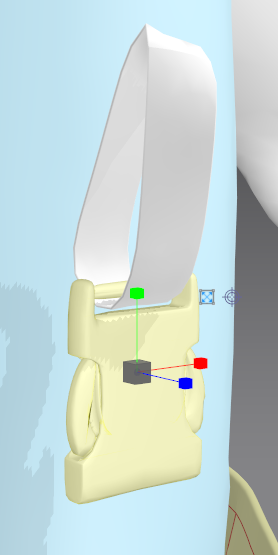
I am having the same problem with something that should be so simple, namely my character just having a belt buckle and a belt. There just doesn't seem to be a way of solving it with MD so that it simulates and folds the clothing underneath correctly. It is really frustrating. I actually stopped my MD subscription last year to look at other tools to simulate cloth including Blender and Houdini.
This bug seems to not be fixed yet, is there a workaround or anything new :)?
No!!! It is really annoying. I have been trying to combine the clothes animation with blender and houdini to try and make something work. No idea when Marvellous are going to fix this bug... if ever. Have been working on an Unreal project using Realallusion characters and really struggling with custom clothing.
@... For complete solids you 100% have to use another software but I managed to import fbx as a garment and apply a material with the trim_leather... preset. Collisions are again not perfect but may work in some cases. I really hope this bug gets fixed.
Having the same problem with the default trims that come with marvelous designer. Did this ever get fixed?
2024 and still unable to make a simple belt or buckle or anchor any hard surface object to clothing :( I really hope this will ever get fixed, it's a huge detriment to many projects in MD.
サインインしてコメントを残してください。