seek help!
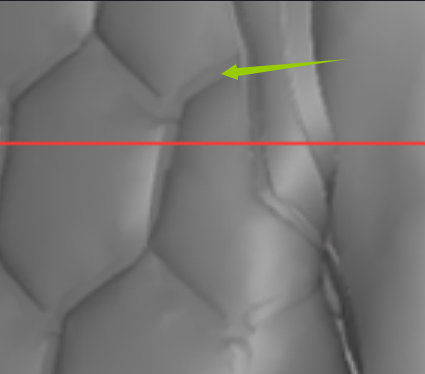
Does anyone know how to make a similar effect?
This effect is similar to bonding.
If you know, can you give me a detailed production process or tutorial link?
Thank you very much!

CD PROJEKT®, Cyberpunk®, Cyberpunk 2077® are registered trademarks of CD
PROJEKT S.A.
© 2021 CD PROJEKT S.A. All rights reserved. All other
copyrights and trademarks are the property of their respective owners.

seek help!
Does anyone know how to make a similar effect?
This effect is similar to bonding.
If you know, can you give me a detailed production process or tutorial link?
Thank you very much!
Create the (hex) tile pattern on your pattern piece with the internal line tool, copy and paste the offset repeat across your garment pattern > clone over a pattern copy to create the rear pattern (it will automatically create the sewing lines) > then flip the normals on the rear pattern piece so all normals point outwards for both pattern faces > in the property editor toggle on pressure > 10 > choose a suitable fabric preset like light weight nylon and then simulate.
Please sign in to leave a comment.