I have just bought the software and been trying this with different sample avatars, sample garments, sample animations nothing was imported or created from scratch. The simulation is fine but when I animate it always crashes without and error or nothing and right back to desktop. Sooo annoying and my first 5 minutes this is like a joke to me :/
CPU: Intel i7 11700k
Memory Size: 32GB
Mac Model Name (for mac users only):
Graphics Card: Asus Tuf 3070ti
Resolution: 4k LG Screen
Language: English

Hi Egemen Turan,
Thank you for contacting us and sorry to hear your trouble.
Could you please send me a video recording so I can better assist you? You can also send your file to us in a support ticket and we can diagnose the problem for you.
I would also like to point you to our Animation Mode Tutorial: [Link]
I would also like to invite you to our Discord Channel to get faster respond form your peers: [Discord Invite Link]
Best regards,
Marvelous Designer Support Team
I'm sorry but there is literally no error messages or anything it just freezes at a random part of the animation and shots down in 3-4 seconds that's all
If there is a crash log somewhere inside the program files I can send you that but there is literally nothing to show :) Hope you get what I mean
You can replicate this just from the garments tab add the orange sample skirt, white sample t-shirt, and add any avatar and any sample catwalk motion. Choose GPU simulation then just increase the Simulation Quality to 5. Hit animate and I am pretty sure it will crash on you
Because I had to fully factory reset my PC and built all the drivers from scratch and the same thing happened and now I am certain this is something on your end guys, sorry to inform you!
My simulation properties are attached you can check them only GPU simulation from the simulate button and made sim quality 5 rather then 1: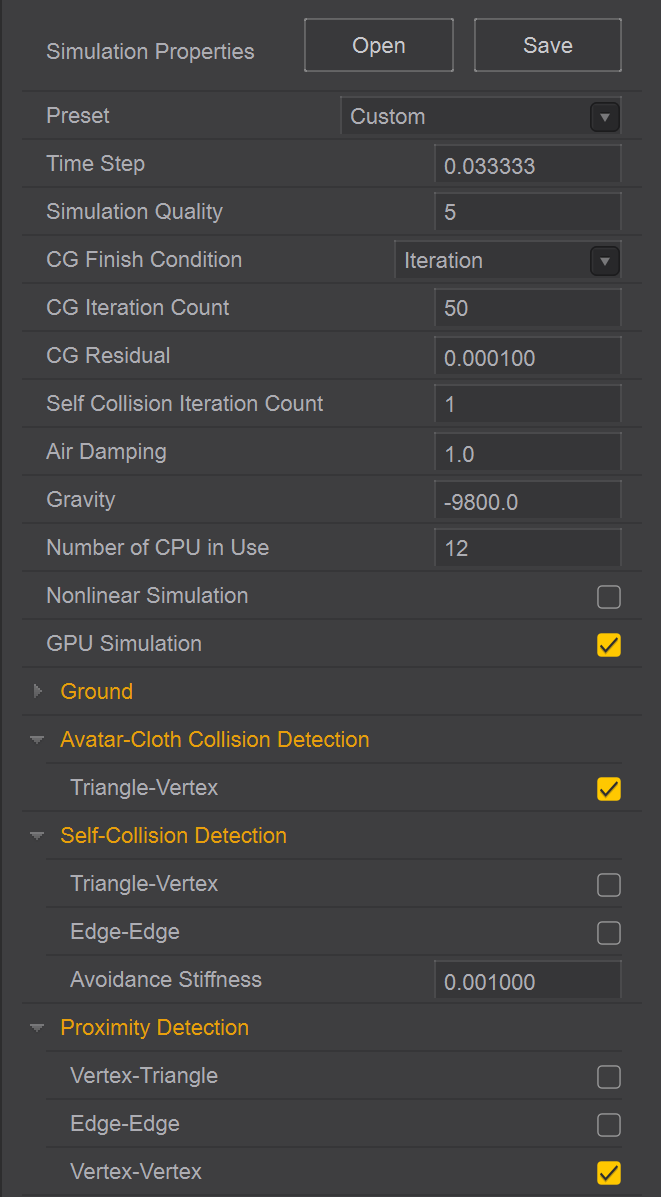
Hi Egemen Turan,
I can't seem to recreate your issue on my end.
What I have tested:
1. Import an avatar from our library Avatar folder (FemaleV2 - FV2_Camila)
2. import a dress from our library Garment folder (Female_ShirringDress)
3. Import a motion from our library Avatar folder (FemaleV2 - Motion - FV2_01_No_Hands_Pose)
4. In the property editor, have GPU simulation check box checked and change the Simulation Quality to 5.
(Please note that you would get better simulation quality using CPU simulation, however, GPU simulation would be faster)
5. Click simulation button and click record, the animation starts and the cache for the garment appears in pink in the timeline.
The version I'm using is Marvelous Designer 11, Version 7.0.339. Could you please send me your project file to me in a support ticket and I can diagnose your file and better help with your issue.
Best regards,
Marvelous Designer Support Team
Ok so I mostly can get through the beginning of the animation but it freezes around the middle and end and yes all of the versions and settings are the same on my end. let me send the project file
Please sign in to leave a comment.