Just updated versions and the simple function tack on avatar is no longer working.

CD PROJEKT®, Cyberpunk®, Cyberpunk 2077® are registered trademarks of CD
PROJEKT S.A.
© 2021 CD PROJEKT S.A. All rights reserved. All other
copyrights and trademarks are the property of their respective owners.
Just updated versions and the simple function tack on avatar is no longer working.
Hi Pitts Adam,
Thanks for letting us know. We have this logged as a bug and are currently working to fix it.
We apologize for the inconvenience and thank you for your understanding.
Also adding to this, Having the same issue but the closer you tack the further it moves away its like tack on avatar is reversed.
when will there be a new version with fix for this bug? I'd like to work in the new version, but without this function it is impossible.
I am having this problem as well. The Pin to avatar doesn't work at all, they show up in the view port but the material just falls to the ground. Will there be a fix for this soon I need it urgently?
Also having the same issue. Really need it fixed in order to work on my final college project!!! Any progress??
I also am having this problem.
Has this been fixed already? This is affecting production at my studio. It would be nice to get an update on the bug at least.
Hello, it will be fixed on the next update which will be released next week. Sorry for the inconvenience.
Hi Danny, is the update available already? This is hindering production for us.
Hi Danny, Can we get an update on this fix? Can we expect it this week or is it being pushed out? Thanks
Hello guys, sorry for such delay. We could deliver the fix next week. At the moment we fixed the issue but we found other errors need to be fixed as well.
I will leave a post once the update is released.
All of my work has been pushed back for almost a month now due to this error. I was really hoping it would be fixed this week. Is there a button in MD that allows rollback to a prior version?
yes you could download old version on download page https://www.marvelousdesigner.com/product/download
Please make sure that deactivate the license before the rollback.
Will it keep all of my settings though? I have customised the UI a lot and I would like to keep my current workflow
You could export it from file> save as > User setting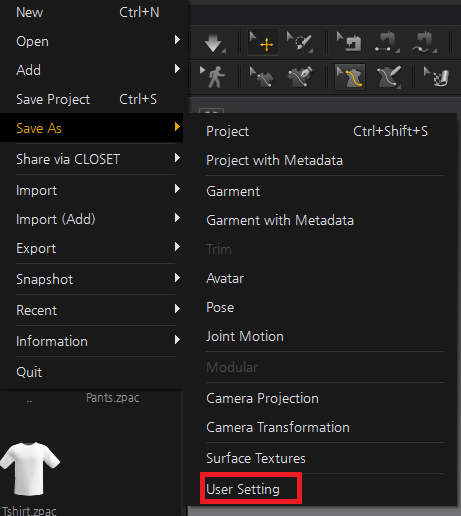
Excellent. Thank you for letting us know we can download previous versions, Danny. This is helpful because this was working a couple of weeks ago. And thank you for all the help with this.
Hello All, the fixed version will be released this Wednesday (KST). Thanks for your patience!
Hello, I have just updated to the latest version and this was the first thing I tried and the piece just drops to the floor and flies off to the side...so unless the fixed version has not been released yet, it still doesnt work looking at this thread.
The update has been released. You can download it on the website. Let us know if you face any issue after updating Marvelous Designer.
Thanks for the update
And thanks for responding so quickly.
But I still have a question after watching the update.
What do you think when you can fix track to avatar.
It continues to be broken.
Hi, I have tried it out on the new update. Thank you! It seems to work now...BUT just a heads up....only in CPU mode. But still drops to the floor if using the GPU simulation mode.
it still doesn't work.. sigh..
请先登录再写评论。