
I have a character that has a rig pose with the arms in the A position. The character however will be arms down most of the time. The director said there will be some instances where the character may need to lift the arms and so the fabric draping needs to look right from both positions. I used a MCX cache from maya so I can raise and lower the arms and I see that when the sleeves raise with the arms, the armpit area of the coat stretches with it and is curved. The coat is also buttoned all the way down, it's a long coat like a trenchcoat sort of, but more formfitting like a suit.
I know that this kind of stretch is natural in suits, but for me it appears to be a curved kind of stretch. I have strengthened the garment and tried changing physics presets but I keep getting the same results. I've spent almost a month trying to adjust the sleeve patterns and the arm hole opening. The director keeps pointing it out. I can't upload the screen shot but I can show you an illustration of what is happening. The left image is arms down, the middle is what is happening currently, and the far right is what I'd like it to be. I need that profile break, that almost angular shape so that the torso to the waist doesn't start bending, but maintaining as straight a line as possible.
Thanks!
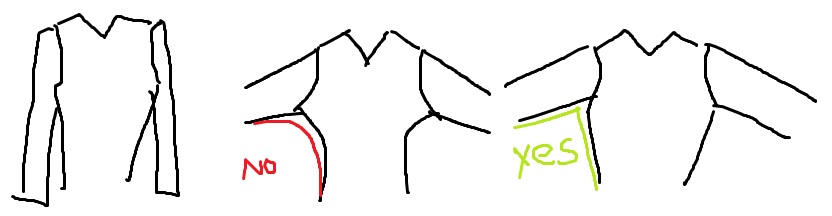
@ Marcuswilm - thanks, I didn't realize I forgot to actually upload the pic.
1. Use the Trace and Flatten tools to get a better fit for your avatar. Check out this video at the timestamp, where Meg is discussing this feature: https://youtu.be/Ulf5HzQTPOE?t=4127
2. Do your garment construction with the arms raised first. Then lower the arms. Yes, you will have a bit more fabric under the arms when lowered, but that is how garments work. That is a problem that tailors have been working around for centuries. Look up ' under-arm gussets'.... The development of the fitted 'suit' is a fairly modern thing. You will either need more cloth on the torso or more cloth on the sleeve to get a fit that looks good in both arms-up **and** arms-down positions. Each avatar will be different, and will need adjustments to a standard pattern.
3.Don't go for strengthening the fabric. Instead add more stretch to allow the fabric to move easier.
@ Rosemary, Thank you so much, very helpful!
You can use the steam tool to cheat how the fabric stretches over the shoulder, but you should simply make well shaped patterns with the arms down by the sides - humans don't walk around with their arms out - cough - well maybe now they do to check distancing , but in the past that was only in video game character setups where garments were sculpted like clay - cloth is a flat material that needs to be developed from the flat form into the compound shape on humans whom pose naturally.Arms out is the worst position for tailoring - as it makes for an unnatural garment shape pattern. Never tailor a garment that is a flat medium on an avatar with arms out - rule #1.
:-)
请先登录再写评论。