
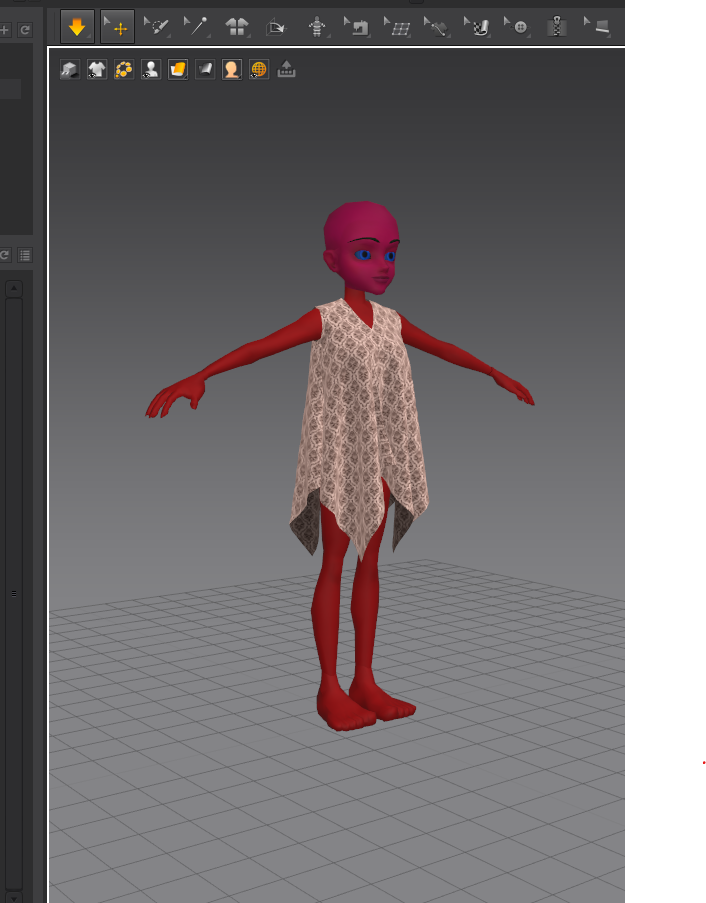
Ok so I am a creator on IMVU and I always tend to make my own room and furniture meshes but I really wanted to branch out and make my own clothing meshes and my Husband ran across MD a while back. Now that I am ready to get serious I am about to purchase the license when my trial runs out. I am trying to set up MD to where it fits my needs and found tons of great tutorials including how to import the IMVU Avatar pose file into Blender and change it to where I can use it as a model in MD. everything worked great I even got it to load in MD but the Avatar is like bright red from head to toe. See Pic below. Does anyone have any idea why that is? I had no errors and she loads just fine, but her skin does not look the way she is supposed too. I guess at this point I would say it would be loverly in future updates to see the option of importing the file without having to open it in a blender and removing the skeleton so I could move the arms and such. love this program so far. Using Windows 10 Desktop and MD version 6.1.645 trial version, and Blender version 2.79 file was exported from blender into OBJ file and was imported through the Avatar menu in MD as instructed in several tutorials.
Hi Cavazos,
Thank you for contacting us.
I'm guessing the reason why the model is red is because you have assigned a red shader or change the vertices color to red inside Blender.
But it is really easy to change the color of the avatar inside Marvelous Designer. Simply click on the avatar and go to the Property Editor on the right. Where it says color click on the square next to it, and change the color to white or a lighter gray.
Best regards,
Marvelous Designer Support Team
请先登录再写评论。