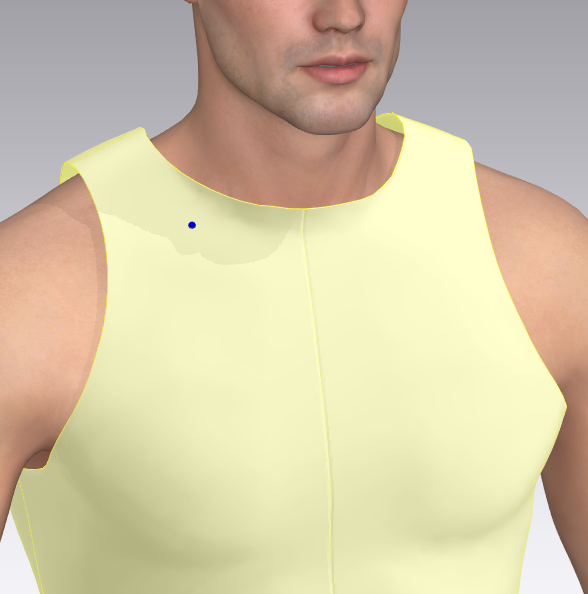
Is there any tip how to snap the clothing directly on the skin of the avatar? It sticks out , see picture.... ? Thank you...
CD PROJEKT®, Cyberpunk®, Cyberpunk 2077® are registered trademarks of CD
PROJEKT S.A.
© 2021 CD PROJEKT S.A. All rights reserved. All other
copyrights and trademarks are the property of their respective owners.

Is there any tip how to snap the clothing directly on the skin of the avatar? It sticks out , see picture.... ? Thank you...
It could be a number of things. I'll cover the most common causes.
1. Imported avatar? Check the size of your figure. MD works in real-world human scale, and the cloth parameters are geared to that scale. If your avatar is too small, the default skin offset will be too large by comparison. Check your avatar's size by the menu Avatar>Measurement>Height measurement. Click on the ground at it's feet, then drag upward to the top of the head. Typical size should be in the 1200-2000 millimeter range (using the default units). If your avatar is too small, you will have to re-import it, carefully watching the unit scale from the exporting program, and the importing option in MD.
2. Check if the default skin offset has been changed. Click on the avatar's skin, and in the Properties editor, under Surface, the first line is Skin Offset. Default setting is 3mm.
3. Did you apply pressure to the garment? Pressure acts like air in a balloon. Default setting is zero. Only use pressure for specific functions.
dear Rosemary,
Thank you so much !!! it was number 2) I reduced the skin Offset. from 10 to 3 and it went well.
Thanks again, your answer was very helpful
Wish you a nice day
christine
댓글을 남기려면 로그인하세요.