Hi everyone
I am fitting the shirt in to t-pose avatar and material bunched up on the shoulders. I understand that if I lower my arms the shirt will smooth out but 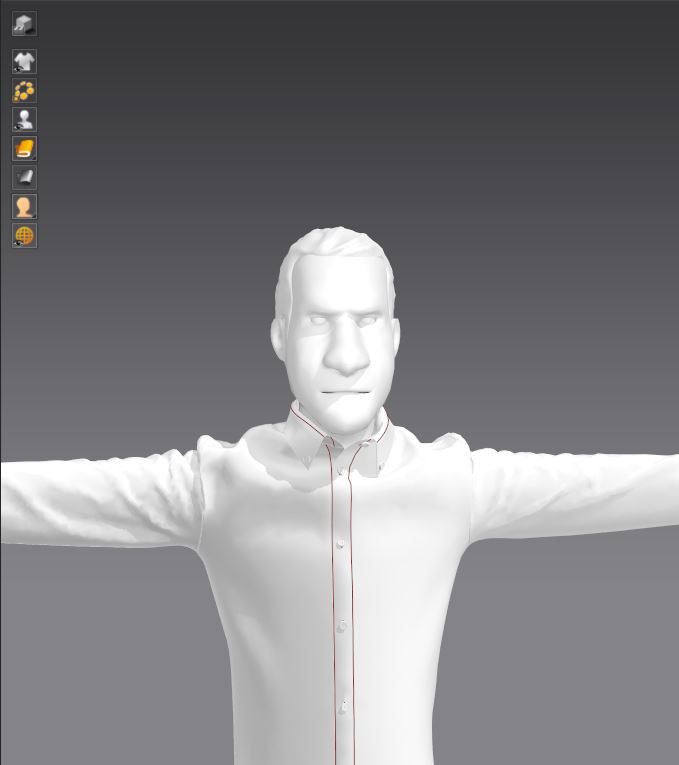 I need t-pose for rigging and mocap - how can I smooth out shirt on the shoulders?
CD PROJEKT®, Cyberpunk®, Cyberpunk 2077® are registered trademarks of CD
PROJEKT S.A.
© 2021 CD PROJEKT S.A. All rights reserved. All other
copyrights and trademarks are the property of their respective owners.

Hi everyone
I am fitting the shirt in to t-pose avatar and material bunched up on the shoulders. I understand that if I lower my arms the shirt will smooth out but I need t-pose for rigging and mocap - how can I smooth out shirt on the shoulders?
Why can't you use the 'A' pose.
Why does it have to be the T pose in the next software? What rigging an mocap system are you using?
Rokoko studio requires model to be in t-pose.
I guess I can make clothes in a-pose and then transform into t-pose but I was hoping for better solution
I will look at it.
Can you make a blend shape in your model editor software going from the lower A arm pose in MD going to the T pose, so that the garment mesh has weight maps in that workflow and not rely solely on the cloth simulation in MD ?
2 other options for you in MD to get rid of the bunching creases.
In MD you can shift to the sculpt workspace mode and smooth out creased mesh.
In the workspace drafting mode you can also use iron to stretch or shrink cloth on the pattern pieces, - it is used for the shoulder area on jackets.
サインインしてコメントを残してください。