Hi!, I'm completly new to MD and maybe this is kind of dumb but I'm having this issue where my garment isn't staying on the top beam of my structure. I've tried increasing the subdivisions on the cloth but it doesn't help, also, I'm using right now a thick leather, however it is not exaclty what I would like, and when I try using a thinner cloth as it is supposed it gets worse. The avatar was made on 3Ds max, and imported as an OBJ os FBX, I've tried both. 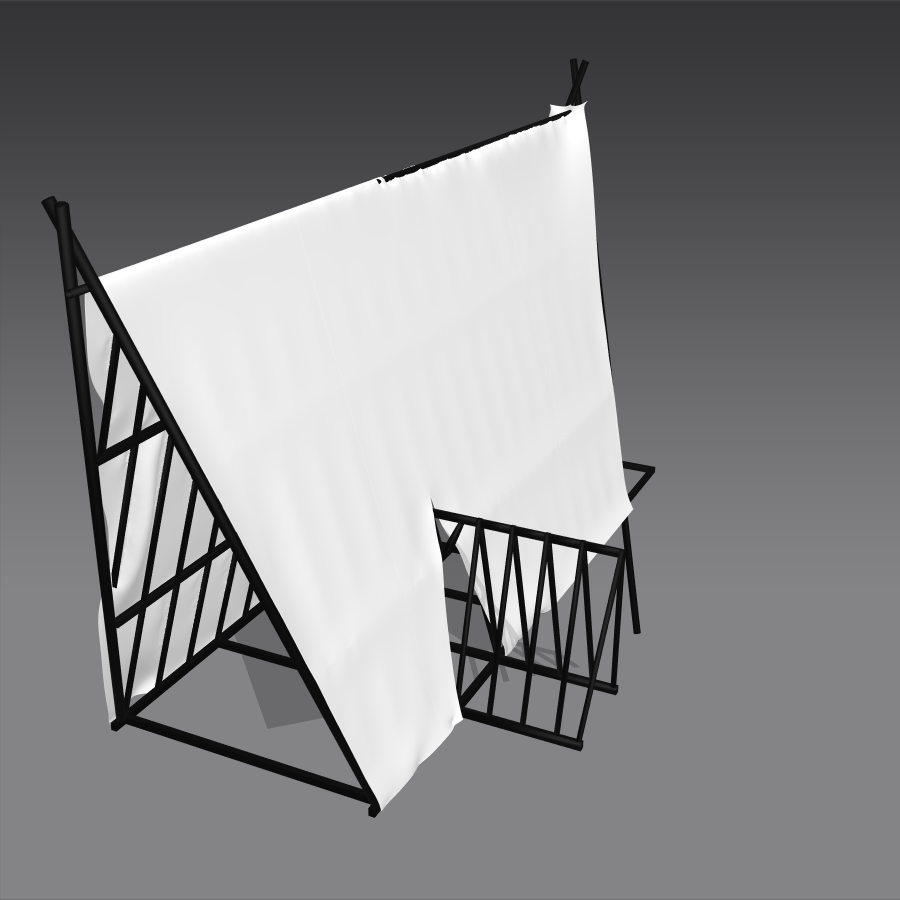

When you collide with an object the mesh areas where you are colliding with and the cloth in that region need to have small enough mesh distance so the vertex count lets the cloth surface smoothly roll around the model bar surface > this means you have to place special attention and focus to the maths and the density of both objects. You cannot for example make a triangle wrap around a cylinder if the sides of the triangle (3 edges) are so long they encompass the diameter of the cylinder. Hence in MD you must ensure your triangular surface mesh (particle distance) is small enough so enough edges allow the cloth to smoothly wrap around the cylindrical bar. So scale is a crucial issue as is mesh face count in these collision areas.
Check the scale of your model, the cloths particle mesh distance (needs to be smaller) and the number of faces in collision at critical areas. This is what is causing the issue, it can be over come very easily by simply checking those scale and poly count items.
Please sign in to leave a comment.