
Hi.
Some months ago I tried MD to do character animation but I discarded it because I found that it was good at simulating static clothes but crashed when the character walked. More recently I saw an animation made with MD and looked fantastic, so it´s obvious that I was doing something wrong.
I use characters made with iClone and at MD I tried the highest quality simulation, high cloth and avatar collision distance and the shortest particle distance, but it failed anyway: the cloth always broke up when the character made any moderately fast movement.
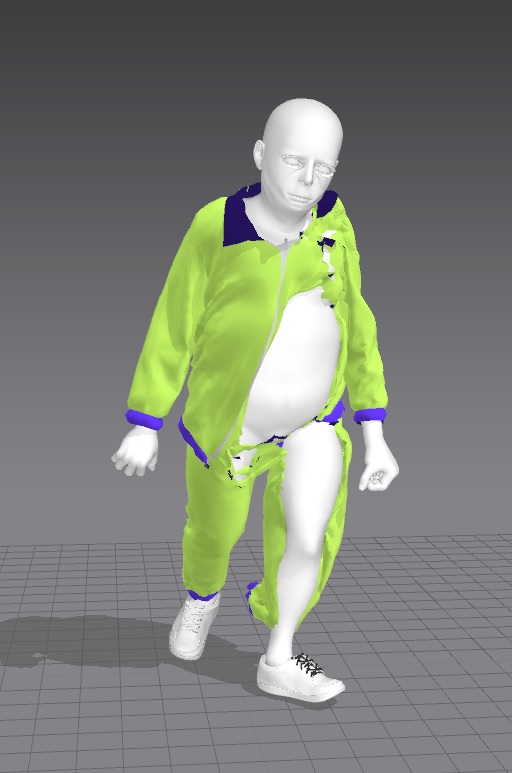
What I was doing wrong? I attach the project in this link.
Thanks.
Some suggestions :
Start simple > Create the same garment /avatar assembly but reduce all the pattern mesh counts to 20mm particle distance. Then ensure you have all clothing items layered to level '0' and that the simulation quality is set to > CPU > Fitting (Accurate). Use this as your test project minimum start. If needed have a lead in animation sequence to get the cloth/garment and avatar pose into the correct position before the main sequence frames. >> Do not use the GPU for recording animated simulation. <<
Then I would try recording the simulation again, the goal is simply to get the cloth animating on the avatar with no poke through or oddball avatar collisions eg: between legs and under arms, etc. As these areas may require you to tweak both the characters pose and animation sequence and pattern collision offset tolerances. Many issues are likely to get thrown up so don't do that at slow speed, do it sensibly as the 1st pass. This will speed up your overall animation simulation process for the project by at least 16X by starting with a high mesh particle distance (fewer polygons). Once you have that simulation 'recky' dry run animation sequence done > it's time to refine. (And only then ... is it time to refine.) You have two options in refining simulation quality and crease/fold quality > lower the particle distance = massive increase in simulation record times with potential errors OR place additional surface textures onto patterns in the garment assembly on areas that you can safely keep a high poly particle mesh distance. Often it is a matter of seeing a cloth animation at 20mm in order to assess what should be 'tuned' to a better quality.
So by keeping it simple as a 1st pass at recording your cloth collision with the animated avatar > you generally win project speed and and also throw up early any additional simulation areas you need to focus in on. Most other stuff you can work around using textures (baking high quality normals onto low poly mesh).
So that's my 1st tip > start simple ... get your project working well at higher mesh particle distance (20mm) and see what you get. Then solve for those issues 1st and only once that is running well lower it to a smaller particle mesh distance eg: 10mm
I often bake down map textures for high frequency creasing an folding - a mix of cloth collision and sculpting > and it is these that I constantly use in animation to fake the high frequency detailing.
Below this high frequency detail for a crass 'puffy shirt' is baked down from a high poly model (flat form pattern) and placed on the pattern piece fabric texture slot > on a 20mm particle mesh garment. The left side panel of the front garment is the same as the right side (20mm mesh particle distance) BUT what differs on the right side is the loaded normal map texture created at a high crease frequency. When this moves under animation it is almost impossible to see the 'CG cheat' I have used to get 32X the speed into the process.
See how I bake a high quality normal map down from a flat 2D pattern onto the UV such that it maps precisely to the pattern piece. This is predominately how I achieve my animations.
The advantage is that it also allows me to test the process inside MD under general realtime simulation to check this will work under animation later. I can also swap out >> non-destructively<< all the stitching detail as texture bakes. Fast and highly efficient with MD's UDIM texture atlas capability.
I can swap out or change custom stitching across an entire garment quickly making sure the frequency of high detail will not impact the animation cycle that I have earlier perfected. This is a highly flexible process that I have used for 8+ years with MD.
See below on this silk fabric where I use both normal map,specular and crease displacement onto simple pattern shapes > this can greatly increase the frequency of how a garment looks even if kept at 20mm mesh particle distance in animation. Note the edge silhouette is kept relatively low frequency whilst the creasing as image maps are high frequency > this keeps mesh count down and animation speeds up.
A great specular fabric texture map will actually create high frequency noise in any animation that takes your attention away from any of the mid level frequency levels faux detail. So it's probably the most important image map at a micro textural level. (I also have anistropic but only because I have a custom build fabric digitizer - you can generally omit that map).
Thanks for your tips. But the thing is that my garment is already quite simple, and I've even tried to simplify it even more, removing the zipper and the neck and sleeves details, and even then it failed. I have only managed to make work a t-shirt or a cape, that kind of things you see in video tutorials that work fine and make you think that this was a no fuss software.
I had tried a 20 mm particle distance too, but I'll try a bigger one and see what happens.
OK, probably I´m the biggest **** in the internet right now. A pal has checked my file and told me that I had left the cloth that I used as pattern reference in front of the character.
I had hidden it but I didn´t know that it still counted for the physics calculation, so the garment collided with it when the character moved. I´m feeling like a ***hole right now.
Thanks for your help.
Yes that will do it.
We've all made mistakes like that with hidden cloth or props at one time or the other - a Homer Simpson moment, part of the learning curve.
I would stick to 20 mm particle mesh distance as the largest for a good cloth animation and if you need finer creasing at standing camera angle step down to 10mm and then only smaller if you have a close up camera position, as the animation time compute step goes up exponentially with every increase in polycount.
On a future horizon I were reading a siggraph '21 paper (link) that was recently produced ... that speeds up the animation time step factor (what causes the bottle neck in MD) up by a 10X to 100X faster (video -link) so I am hoping the Marvelous Designer and CLO3D developers are onto this paper and the possible speed increase ... that all CLO3D and MD users could do with tomorrow.
Please sign in to leave a comment.