
Hello, i export a cloth mesh from blender, remesh from Quad Remesher
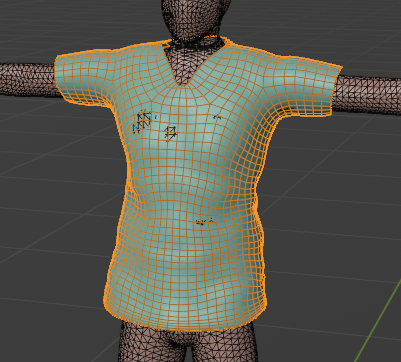
and add Obj as garment(withUV)
but the mesh damage, very low poly
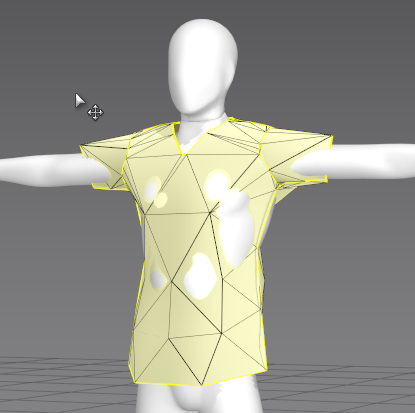
Don't know why and how to fix it...
just want to test a motion alembic body with custom cloth, and check the simulation result,
so need external Garment from Maya, Blender etc., can't create new one in MD.
This is likely due to everything being imported into Marvelous Designer at FAR too small of a scale (You can tell by how large the grid is to the avatar, you can also compare its height to the default avatars for example). Watch the ENTIRETY of this YouTube video from our channel covering the issues when you import your avatar/ assets TOO SMALL for the scene like you have above. It contains some explanations, troubleshooting and how to best fix these issues depending on your workflow https://www.youtube.com/watch?v=-F1vEhYammI
Hi Lai Edgar,
Thank you for contacting us,
The reason why this is happening is because your character scale is too small. The default unit in Marvelous designer is millimeter, and your character is currently only around 20 millimeters tall. When import your character, you can set the import scale, please make sure your character is at a similar size as the avatars in the Marvelous Designer library.
You are able to change the subdivision of the mesh using the particle distance setting in the property editor. a lower particle distance will make the mesh denser.
randomized triangle will produced the most realist cloth quality in simulation, since the mesh can only be bend along the edges of the geometry. So when you import your .OBJ and checked "Trace 2D Patterns from UV Map", Marvelous designer will recreate your garment by tracing your mesh UV. If you want to simulate with your original remeshed geometry, please uncheck "Trace 2D Patterns from UV Map" but still import it as a garment. Please note that, by unchecking "Trace 2D Patterns from UV Map", you are able to simulate, but the amount of parameters and properties you are able to adjust is limited.
Please watch our Quick start Tutorials for more information on the above subjects [Link]
Best regards,
Marvelous Designer Support Team
Got it!!! Thank you!!!
Please sign in to leave a comment.