
To allow other folks to help better, write some more descriptions if your issue is related to technical issues.
- ● Marvelous Designer Version (ex: 7.1.111) : Marvelous Designer 12.1 (Ver. 7.2.191)
- ● OS Type : Windows 10 64 bit
- ● Mac Model Name (for mac users only) :
- ● CPU : Intel(R) Core(TM) i7-7700HQ CPU @ 2.80GHz 2.81 GHz
- ● Graphic Card : On board graphics (HP Omen laptop 17-an0xx)
If you need a staff member to look closer at your issue for technical support. Please contact the Marvelous Designer support team.
I've been trying to do a few tutorials, and every time I try working with/creating patterns, it only shows one piece in the 2D viewport. Any other pieces I create aren't shown in the 2D viewport. I've tried resetting my viewport. I've restarted. I've done everything I know how to do to reset everything and nothing is working. I have extensive experience working with Adobe suite of products and I'm learning Blender, so I'm not a total idiot when it comes to using various art type programs and trying to get back to "factory settings." I can't figure out what's wrong here.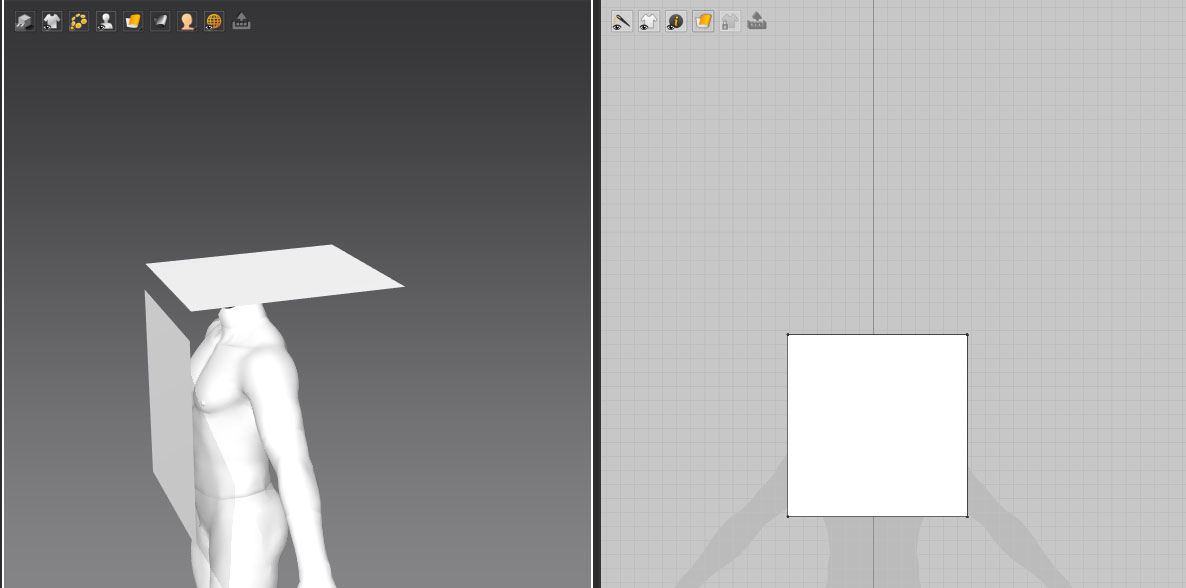
Hi Sojourn
Please attach a video that shows the steps previous to the errors. That way will be easier to locate the source of the issue.
We recommend to beginners first start learning the beginner's playlist we have on our Youtube Channel for best practices with the software.
Also working with our default avatars for the first time is highly recommended. Many times customs avatars could carry some errors or wrong sizes that could slow down your learning curve. Ones you dominate the tools and the needs for the correct display of your garment, feel free to work with your avatar.
Please sign in to leave a comment.